


Soliword: Solitaire Link Word
4.877.00 Reviews
App Specs
- Version
- 1.1.1
- Updated On
- License
- Free
- Downloads
- 10,000+
- Developer
- LifePulse Puzzle Game Studio
- Categories
- Word
- Platform
- Android
Screenshots
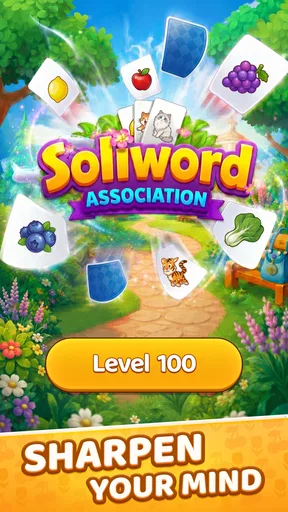
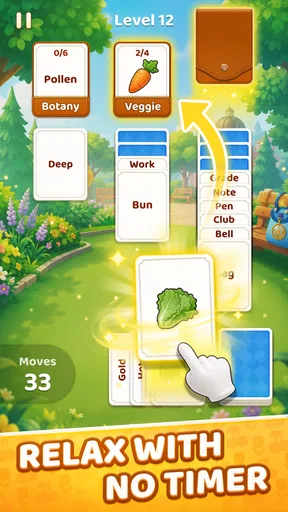
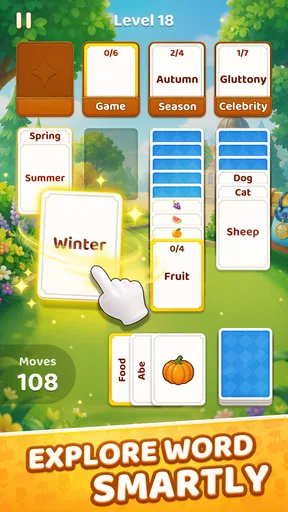
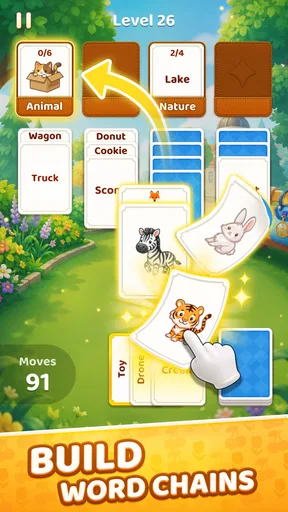
 Analysis by AppCompare
I spent time with Soliword: Solitaire Link Word, a word game from LifePulse Puzzle Game Studio that combines card-table familiarity with association-based word solving. Its central idea is simple: sort and match words while working through a solitaire-style puzzle. What makes that combination worth discussing is not the size of the feature list, but the change in mindset it creates. I was not only looking for a valid word; I was also watching how the available cards and word relationships shaped my next move.
That focus gives the game a distinct place among casual word titles. It is less like a traditional crossword, where clues usually point toward one answer, and less like a standard solitaire game, where suits and ranks dominate every decision. Here, the appeal comes from connecting language with visual organization. I found it most enjoyable in short sessions when I wanted something quiet but still mentally active.
How the word-and-card connection changes each puzzle
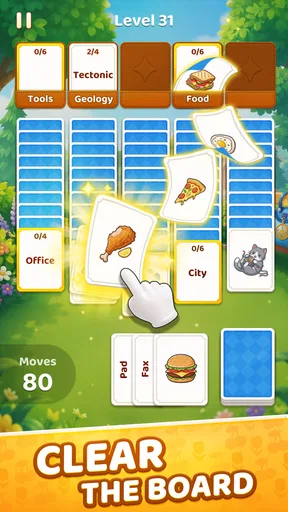
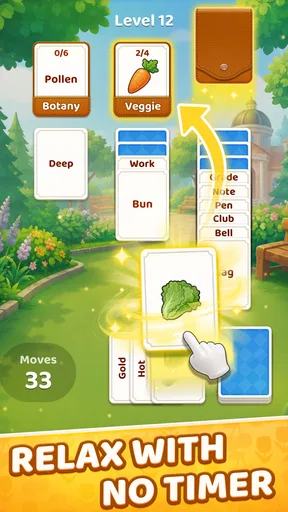
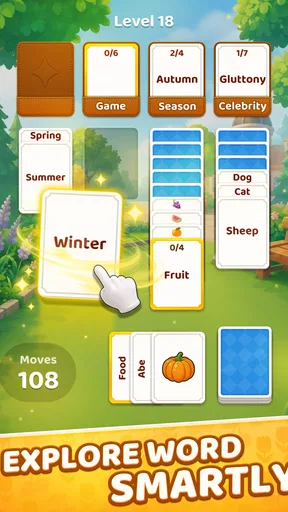
The important capability is the way word association and solitaire-style sorting work together. The cards are not merely decoration around a word quiz. They give the puzzle a spatial structure, so I had to consider what was immediately available, what might be uncovered by a match, and whether a tempting choice would leave the layout less manageable afterward.
That extra layer changes the rhythm. In a conventional word game, I can often concentrate on vocabulary alone. In Soliword, I found myself switching between two questions: “Do these words belong together?” and “Is this the right time to make that connection?” The first question tests recognition, while the second rewards patience and planning. Even when the association feels obvious, the order of actions can matter to the flow of the board.
This is where the game’s identity becomes clearer. It is not trying to replace a full crossword, an anagram marathon, or a pure card solitaire app. Instead, it offers a compact hybrid for players who enjoy language but prefer a visual puzzle with movement and arrangement. The experience feels approachable because the basic objective is easy to understand, yet the combination can still make a familiar match feel more deliberate.
I also liked that the concept encourages a different kind of vocabulary thinking. A word may connect through meaning, category, context, or a familiar pairing rather than through spelling alone. That makes the game feel more flexible than a title based only on letter manipulation. At the same time, that flexibility can occasionally make a choice feel less obvious, especially if I am approaching the puzzle with a very literal definition in mind.
What a normal play session feels like
In practice, I approached each board by scanning the visible words before committing to the first match. That small pause helped me avoid treating every available connection as equally useful. I looked for relationships that seemed both clear and likely to improve the arrangement, rather than immediately selecting the first pair that caught my eye.
Worth Reading Before You Choose

Flipboard Shows What News Apps Must Do Beyond the Feed

Switching to Android Auto Means Rethinking Your Driving Routine

Google Calendar Makes a Crowded Week Easier to Manage

Ludo King Makes the Most of the Minutes Between Plans

Baby Panda World Brings Quick Play to Modern Phones, but Its Game Library Feels Busy

ESPN’s Live Game View Makes Following Close Games Easier
The solitaire influence gives the session a satisfying sense of progress. A successful match is not only an answer; it is also a step toward making the remaining layout easier to read. This makes the act of clearing or organizing the board feel more rewarding than simply tapping through isolated questions. I could see why the format works well for players who enjoy gradual visual order.
One useful habit is to separate certainty from convenience. If I recognized a strong association, I treated it as a candidate, not an automatic move. I then checked whether another visible option would open a better route through the cards. This is a small but meaningful adjustment, and it is one of the more interesting lessons the game teaches without announcing it directly: a correct answer is not always the most helpful immediate action.
Another practical tip is to read the entire visible group instead of focusing on two words at a time. A word that appears to have one natural partner may also belong to a broader theme shared by several cards. Looking at the full arrangement reduces tunnel vision and makes the puzzle feel more like sorting than guessing. For me, this was especially helpful when the first apparent match did not produce a satisfying next step.
The game is also easy to fit into a spare moment. I can imagine playing it while waiting for an appointment, taking a short break, or winding down before bed. The format does not demand the long concentration of a large puzzle book, but it still gives the mind something specific to work through. That balance is one of its strongest practical qualities.
A realistic everyday use case
My best use case for Soliword is a ten-minute break when I want more involvement than scrolling but less commitment than starting a long game. I would open it after finishing a task, solve a few boards at a comfortable pace, and stop when my attention began to fade. The card-and-word structure gives the break a clear beginning and end, which is useful when I do not want to lose track of time in an endless feed.
It can also suit someone who enjoys casual wordplay but becomes tired of repeating the same letter-based mechanics. If anagrams and word searches start to feel too similar, the solitaire arrangement adds a visual decision-making layer. Conversely, a player who wants a pure vocabulary challenge may find the card structure distracting rather than refreshing.
I would not describe it as a replacement for a serious daily crossword. Crosswords tend to reward clue interpretation, broad knowledge, and long-form deduction in a different way. Soliword is better for a lighter, more modular session where the satisfaction comes from linking words and improving the layout. A standard solitaire app is also a better choice if you mainly want card strategy without language judgments.
Where the format works especially well
The hybrid design is strongest for players who like patterns. I enjoyed noticing not just individual meanings, but the shape of a group: which words felt related, which ones were outliers, and which match might simplify the rest. That makes the game a reasonable fit for casual players who enjoy organizing information as much as solving clues.
It may also appeal to families looking for an Everyone-rated game that is easy to explain. The premise does not require specialist knowledge of card games or advanced word-game terminology. A younger player and an adult could understand the basic goal quickly, although the quality of the experience will still depend on vocabulary familiarity and comfort with less literal associations.
For language learners, the game could provide incidental exposure to relationships between words, but I would treat it as supplementary practice rather than a structured learning tool. It does not replace lessons, pronunciation work, or a dictionary. Its value in that situation is the chance to encounter words in connected groups and think about how meaning changes with context.
Players who prefer competition may need to adjust expectations. The appeal here is the puzzle itself and the satisfaction of making a clean sequence of decisions. If your ideal word game depends on leaderboards, head-to-head rounds, or a visible race against other people, this quieter format may feel limited. I found it more suitable for personal focus than social rivalry.
The tradeoffs behind the simple presentation
The same simplicity that makes Soliword approachable can also make it feel less substantial to players searching for a large system of progression. Its main attraction is the word-card interaction, so anyone expecting a story campaign, elaborate customization, or a broad collection of unrelated modes should look elsewhere. I consider that a design choice rather than a flaw, but it does narrow the audience.
There is also a subjective challenge in association puzzles: not every connection will feel equally natural to every player. A person’s background, vocabulary, and preferred meanings influence how quickly a group makes sense. When a relationship feels indirect, the experience can shift from satisfying deduction to trial and error. I generally enjoyed the interpretive element, but players who want one unmistakable answer from every clue may become frustrated.
The free entry point lowers the barrier to trying it, while optional purchases range from $1.99 to $99.99 per item. That wide spread is worth keeping in mind before spending. I would begin with the free experience and decide only afterward whether additional purchases genuinely improve my enjoyment. For a casual word game, I would be cautious about paying simply to move past a difficult moment; the challenge is part of what gives the format its value.
Because it is a mobile game, it is also best approached as a focused diversion rather than a complete puzzle hobby. If I wanted deep strategic card play, I would choose a dedicated solitaire title. If I wanted dense clue construction, I would choose a crossword app. Soliword occupies the middle ground, and its success depends on whether that middle ground matches what I want at the moment.
Device fit, access, and what to expect
The game is free to start, carries an Everyone content rating, and runs on devices using Android 8.0 or later. That makes it accessible to many Android players without requiring a recent handset. The current version is 1.1.1, and the game was released on May 21, 2026, so anyone installing it should expect a relatively early stage of its product life rather than a long-established puzzle platform.
Its average rating is 4.8 from around 932 ratings, with around 76 written reviews, and it has passed 10K installs. Those figures suggest that the concept has found an interested early audience, but I would still judge it by personal taste because word association is unusually subjective. A strong rating cannot guarantee that every relationship will feel intuitive to every player.
LifePulse Puzzle Game Studio has chosen a focused premise instead of presenting Soliword as an all-purpose game collection. I appreciate that clarity. The version available to me is easiest to understand when I treat it as a compact association puzzle with solitaire presentation, not as a replacement for every other word or card game on my phone.
Who gets the most from the experience
I would recommend it most to players who like word puzzles but want a little more structure than a list of clues. The card layout gives each decision a visible consequence, and the association element keeps the session from becoming a routine sequence of letter rearrangements. It is particularly appealing if you enjoy pausing to compare several possible moves instead of tapping the first answer that comes to mind.
It is also a good fit for people who prefer calm, self-paced games. I did not need to prepare for a long session, memorize complicated rules, or commit to a competitive match. The useful mindset is to play attentively but casually: scan the board, identify relationships, and think about order. That approach brings out the game’s strongest quality, which is the small tension between knowing a match and choosing when to use it.
I would suggest skipping it if you dislike ambiguous word relationships, want a highly competitive format, or expect extensive card-game depth. A traditional solitaire game will be more satisfying for someone who cares about suits, ranks, and probability. A conventional crossword or spelling game will be better for someone who wants language to remain the sole focus. Soliword is for the player who wants both systems to influence one another.
After playing it, my view is that the central capability is genuinely effective: connecting word association with solitaire-like sorting makes short sessions feel more thoughtful than a basic matching game. It is not a universal word-game replacement, and the interpretive nature of some matches may not suit everyone. Still, for a free, Everyone-rated puzzle that turns vocabulary into a visual sequence of choices, Soliword is a smart pick when you want a quiet break with just enough strategy to keep your attention engaged.
Pros
- Combines solitaire and word puzzles for varied
- relaxing gameplay.
- Short rounds make it easy to play during quick breaks.
- Word challenges help expand vocabulary and spelling skills.
- Simple card-linking controls are easy for new players to learn.
- Progression and daily challenges encourage regular play.
Cons
- Difficulty can rise sharply when unfamiliar words appear.
- Some levels may feel repetitive after extended play sessions.
- Hints or extra moves may be limited without watching ads.
- Gameplay depends on a steady supply of new puzzles.
- Small card text may be difficult to read on compact screens.
FAQs for Soliword: Solitaire Link Word
What is Soliword: Solitaire Link Word?
Soliword: Solitaire Link Word combines classic solitaire-style card play with a word puzzle challenge. Instead of simply clearing cards, you link letters or words to solve each level. The game is designed for short, relaxing sessions, while gradually introducing more difficult layouts, vocabulary challenges, and strategic decisions as you progress.
How do you play Soliword: Solitaire Link Word?
Gameplay generally involves selecting available cards and arranging or linking letters to create valid words while following solitaire-inspired rules. You need to think carefully about which card to remove or reveal first, because an incorrect choice can block useful letters later. The combination of card planning and word knowledge makes each puzzle feel different.
Can Soliword: Solitaire Link Word be played offline?
Many puzzle and solitaire features may remain available without a constant internet connection, making Soliword convenient for travel, commuting, or situations with limited data. However, online access may still be required for advertisements, cloud synchronization, updates, special events, or in-app purchases. It is best to launch the game online once before relying on offline play.
Is Soliword: Solitaire Link Word free to download?
Soliword: Solitaire Link Word can typically be downloaded at no initial cost, but the free version may include advertising, optional purchases, or limitations connected to hints, extra moves, boosters, or other resources. Before downloading, check the store listing for the current pricing model and review any purchase settings if children may use the device.
Is Soliword: Solitaire Link Word suitable for all ages?
The game is generally approachable for players who enjoy word puzzles and casual solitaire, since the controls are simple and the difficulty usually increases gradually. Nevertheless, age ratings can vary by platform because of advertising, optional purchases, or online features. Parents should review the store rating and device restrictions before allowing younger players to download it.


